If you want to administer a remote, unattended server or PC, you must install Ammyy Admin Service which will allow you to do the following:
- Restart computer
- Log in/Log off
- Switch users
| Ammyy Admin Service for unattended servers
administration installation guide |

Download PDF |
Ammyy Admin Service installation guide
- 1. Log on to Windows as administrator.
- 2. Download and save to disk Ammyy Admin.
- 3. Launch Ammyy Admin.
- 4. Add permissions and password for the Operator's computers.
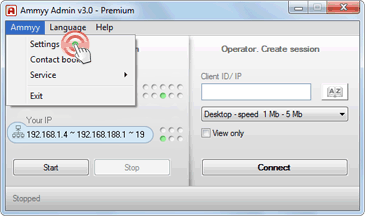
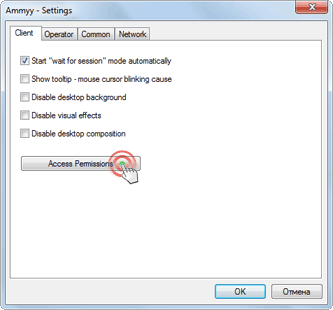
- 4.1. Press menu "Ammyy" -> "Settings" and press "Access Permissions" button.
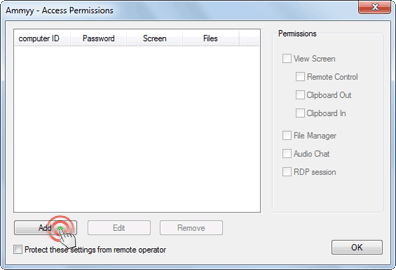
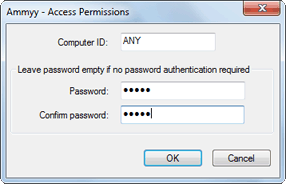
- 4.2. Press "Add" button and specify the Operator's computer ID (or leave ANY), password and permissions.
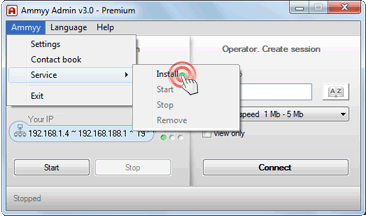
- 5. Install and start Ammyy Admin Service.
Press menu "Ammyy" -> "Service" -> "Install". Then press menu "Ammyy" -> "Service" -> "Start".
 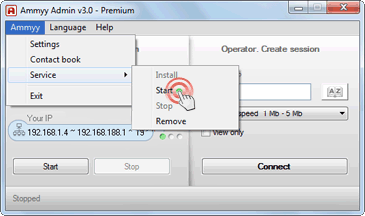
Ammyy Admin Service is working now! You can close Ammyy Admin application.
|