Ammyy Admin is a powerful multi-task solution for remote
desktop sharing, remote computer administration and distance learning from any location in the World.
The remote desktop is ready to use within a few seconds without installation or specific settings. Just start Ammyy Admin and get all the application features for remote administration, remote assistance, remote office, on-line presentations, and distance education without Firewall issues, IPs and port settings, NAT, or worries about security of the transferred data.
To begin working with Ammyy Admin you have to launch the application on the Operator's and the Client's PCs.
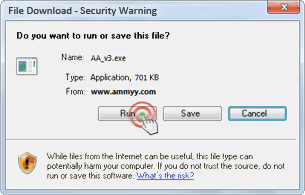
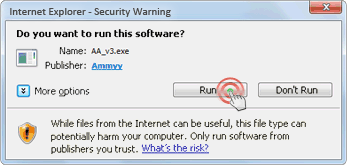
Security warning
Start application by clicking Run.
Step 2. Session start
(Client)
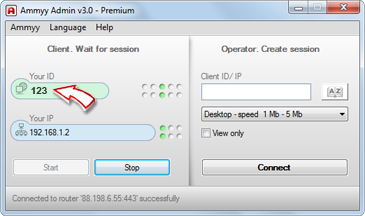
The Client has to give the ID or IP to the Operator in order to let him connect to the PC.
Session start
(Operator)
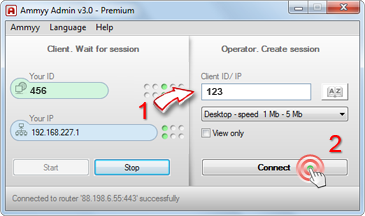
The Operator types in the Client's ID or IP (1) and clicks the connect button (2). Remote control will start in a few seconds.
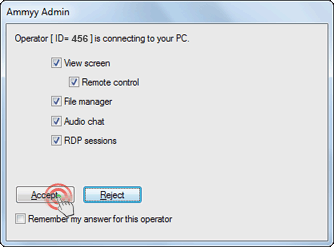
Step 3. Client's PC control confirmation dialogue
The Client has to grant connection for the Operator.
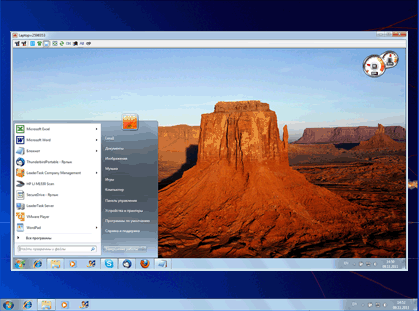
Session started
The Client's remote desktop will be available for control after authorization. You can use full-screen mode and work with a remote PC as if you're sitting right in front of it.
Connection settings, file manager (1), voice chat (2) and more are available on the control panel.












 How
Ammyy Admin can be used
How
Ammyy Admin can be used
