
Remote Desktop Access - It's easy with Ammyy Admin, multi-task free remote control software
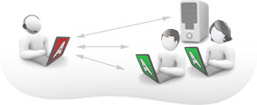
You can easily share a remote desktop or control a server over the Internet with Ammyy Admin. No matter where you are, Ammyy Admin makes it safe and easy to quickly access a remote desktop within a few seconds.
Ammyy Admin is trusted by more than 8 000 000 personal and corporate users.
Remote desktop sharing becomes easy with Ammyy Admin.
You can manage network computers and servers remotely without complicated NAT settings adjustments or Firewall problems. Provide your colleagues remote desktop assistance and be confident all the transmitted data is reliably secured. Using Ammyy Admin as a tool for remote desktop control is the best way to save time and money.
Remote office
You will have quick and easy access to your remote office PC desktop via the Internet from anywhere, at any time. Remote desktop access lets you retrieve necessary documents and files from your work PC or activate specific software installed on the office computer. Ammyy Admin is also a perfect solution for enabling employees to work offsite from a remote location.
On-line presentations/distance education
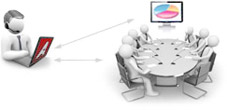
With Ammyy Admin it's easy to arrange on-line presentations or hold virtual classes for distance education. You can host your presentation featuring class materials right in the remote desktops of meeting participants or students in the virtual classroom, communicating with them via real-time voice chat.
To start remote desktop control session with Ammyy Admin you don't have to download and install massive remote control software which brings dozens of files and records to user's and system folders or system registry.
All you have to do is to download a tiny (0.5 Mb) Ammyy Admin exe file, start it and enter a computer ID which you want to connect to. It's really the simpliest way to establish a connection to a remote PC avoiding tedious settings adjustments. It will take no longer than 20 seconds from the moment you download Ammyy Admin to the moment of the first remote session launch.
Ammyy Admin offers it's users a sophisticated set of authentication settings providing options to grant access manually, by predefined computer IDs or by password. All these work in combination with advanced hybrid encryption algorithm (AES+RSA). The encryption standards that we've used in our software are well-known for their reliability and are used by national Governments.
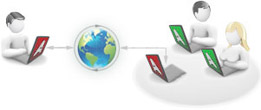
This means you're able to establish access to a remote machine from any PC that is connected to the Internet, no matter if it has real IP adress or is behind NAT in Local Area Network. This option provides opportunity to access remote office or home PC from all over the world keeping up with high level of data transfer security.
You can use Ammyy Admin not only as a tool for remote computer control but also as a free tool for voice communication with your relatives and partners over the Internet. Moreover Ammyy Admin offers a conveinient file manager which makes it easy and quick to retrieve files from remote PC.
Ammyy Admin allows it's users to administer a remote unattended server or PC with the use of Ammyy Admin Service feature. This includes option to restart computer remotely, log in/log off or switch users. Present feature is the most actual among system administrators.
What is remote desktop access and how does it work?
The term implies secure remote access to a distant PC via remote desktop sharing software.
The remote control software processes the image on the display of remote computer and brings it to the local computer.
The essence of this procedure lies in copying the
remote PC display and redrawing it on the local machine.
Keyboard inputs and mouse moves are also communicated to the remote computer, where the machine interprets them as if they had been inputted by a person sitting right in front of
the local PC.
All the information to be send during the session is compressed to achieve productive operation for both high and low-bandwidth connection.
Remote desktop connection let's you have access to all of remote PC applications and data. Common features included with remote control software are file transfer, voice chat and remote PC control itself.
Nowadays use of software for remote computer control and all the benefits it offers became more than just convenience but rather necessity for most businesses. Tech support, remote system administration, corporate webinars are the most applicable realms of remote computer control software.